

Tellius 6.4: Put Kaiya to Work, With You in Control
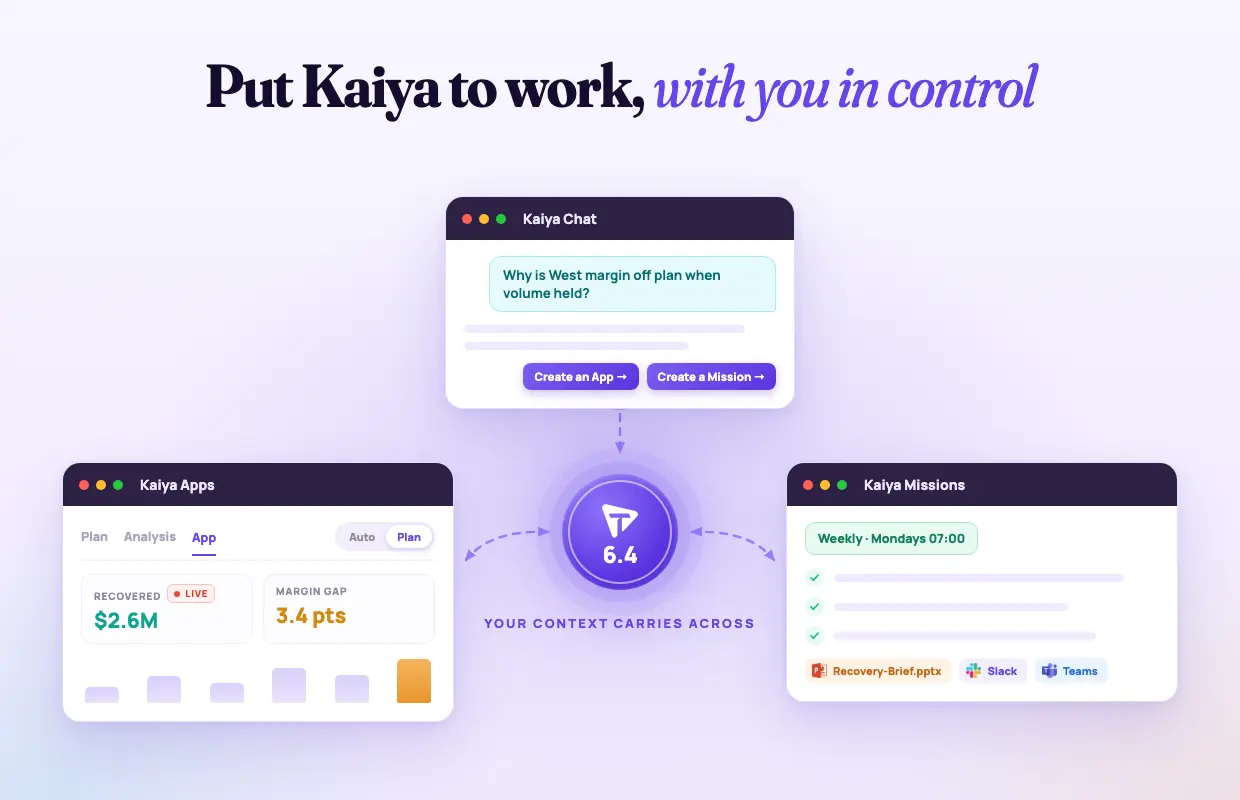

Today we're excited to ship Tellius 6.4.
Tellius is an AI solution for a commercial, finance, and procurement team serious about getting work done. It’s powered by AI workers that run a number of agents, each with one job, against the definitions and permissions that team already governs.
In 6.3, Tellius already met your team where it works: in the browser, in Slack and Teams, and through MCP in the agents you already run. 6.4 is about what our AI workers do once it is there. It finishes more of the job, and you stay in control of the parts that matter: what gets built, what runs every week, and what changes in your systems.
The answer was never the job
Anyone with a recurring piece of work knows that the answers you get from a typical AI chat consistute like 20% of the project. A commercial lead, for example, asks why NBRx fell in the East, gets a credible explanation, but then the real work kicks in of turning it into something regional directors can open on Monday, rerunning it every week without the number drifting, getting the at-risk territories in front of the reps who own them, in the CRM they use, before the call plan is set.
Today that last eighty percent is a person, a spreadsheet, some late nights. For example:
- A CPG revenue growth manager finds that a promotion pulled demand forward instead of lifting it. The finding changes nothing until it changes the next cycle's plan and the trade budget attached to it.
- An FP&A analyst explains a margin miss. The explanation has to become the variance package that runs every close, on the same definitions every time, and land in the deck before the review.
- A RevOps lead identifies renewals at risk. The list has to reach the account owners as tasks, with the reason attached, in the system they are measured on.
Most AI tooling built in the last two years stops at the answer. Point a model at a warehouse and it will write the query. It will not build the App, run it on a schedule, keep the number consistent from one week to the next, or prepare the write to Salesforce or Snowflake with a record of who approved it. That is the work Tellius 6.4 takes on.
From a question to an App and a weekly Mission, in one conversation
Ask why NBRx fell in the East. Before Kaiya plans anything, it checks that the columns the question needs exist and what values they hold. If two fields could mean "new patient starts," it asks you which one, rather than picking on your behalf. The plan appears one step at a time, is reviewed for soundness before it runs, and if a step fails, only that step is rewritten. The answer comes back checked against the question you asked. In the illustrative East case, three drivers explain most of the decline: coverage lost in two territories, a payer mix shift toward restricted plans, and a launch competitor's sampling push. Each figure carries a citation to the query behind it.
Then the part that used to be a handoff. At the end of the answer, Kaiya offers what applies to that analysis: drill into the data, build an App from it, make it a weekly Mission, or export it to PowerPoint. Choose the App, and Kaiya opens a new thread scoped to that work with a summary of the conversation carried across and shown to you, so the region, the metric, the payer filter, and the cited findings are the starting point rather than something you restate. Choose the Mission, and the same context becomes the recurring job. Chat, Apps, and Missions share one history, so the thread that produced the App sits a click from the App.
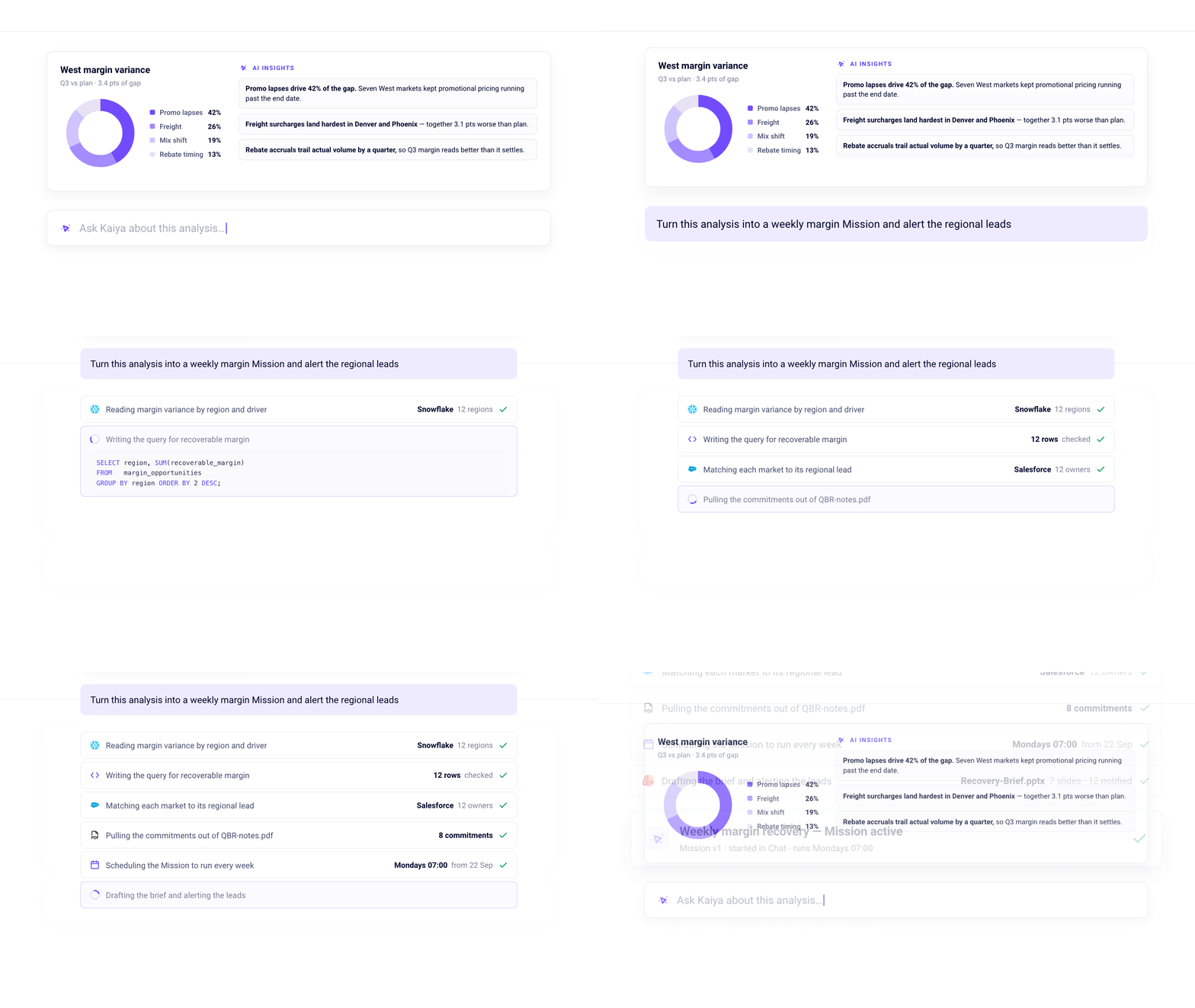
This works because each Kaiya surface is now a tool-using agent rather than a fixed pipeline. It checks the data, decides what to do, inspects the result, and tries another approach when the first one is weak, within the same turn. Until now, a wrong first guess was a wrong answer. Now it is a step Kaiya repairs before you see it.
What you get is a week that starts differently. The investigation you ran on Tuesday is the App the regional directors open on Monday and the briefing that lands in their Slack channel, on the same definitions, with the same citations.
Decide before it builds
Every team that has asked an AI to build something has watched it build the wrong thing, confidently, at full cost. 6.4 puts a decision point in front of that.
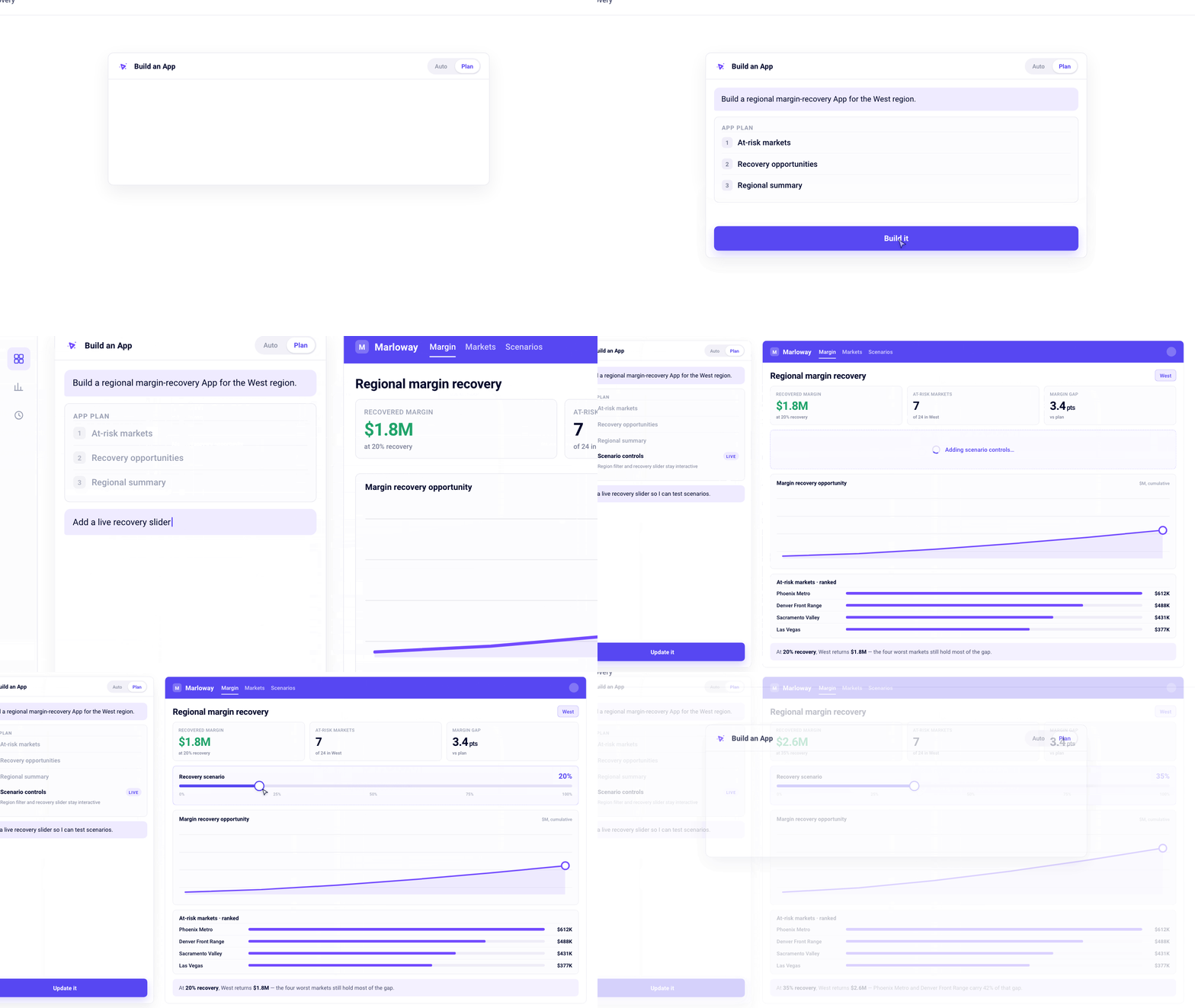
Kaiya Apps now run in one of two modes. Auto works the way App chat always has: describe what you want, approve the plan, and the turn runs through to a saved App. Plan stops before any of that. Kaiya reads your schema, works out what the App should be, and writes the definition. Nothing is built and nothing is run. No analysis plan, no data, no code, no version. You settle what the App is over as many rounds as it takes, and because a Plan-mode turn never queries your source, shaping an App costs no warehouse time.
The plan is laid out as pages, sections, and analyses, with each section tied to the analysis step behind it. Before anything exists, you see where a given number on the page will come from and, when a section looks wrong, which step to change. Ask a question about the data in Plan mode and Kaiya answers it without authoring anything. An App that already exists can be switched into Plan mode and reshaped, adding sections or converting it to live queries, with the revised plan shown each round while the active version stays up for everyone else.
A plan review has three outcomes. Approve it and the build proceeds. Cancel it and every tier is restored together, so an App is never left with a plan describing one thing and data describing another. Ask for a change, and the plan is revised and shown again with the change named.
Missions get the same discipline in a single workspace. Kaiya sits on the left as a conversation. The Mission sits on the right across Steps, Preview, Triggers, and Schedule. A Diagram view draws each step to the steps that consume its result, which is how you read a Mission that branches or a Python step that draws on two earlier queries. Edit several steps in place and apply them in one pass. Then run Preview: it executes the plan as a draft and shows what each step returned, with the generated summary underneath and citations on every figure it reports. You confirm that a Mission produces the right answer before it produces it for anyone else.
Act through MCP. Approve every write.
Tellius already runs as an MCP server, so Claude, ChatGPT, or Cursor can call into your governed definitions. 6.4 adds the opposite direction. Kaiya is now an MCP client. It queries the servers you have connected, brings their data into an analysis, and writes back where a server supports it.
Until now, the only way to bring data into a Deep Insight, Mission, or App was a SQL query against your data sources. A connected MCP server now does that job too. Kaiya queries the server and saves what comes back as a step in the plan, and the steps after it read from that step. Saving the result, rather than holding it in the conversation, is what lets a later step work on the full set of records instead of a handful. A Mission pulls the open opportunity list from your CRM, and a later step scores it, summarizes it, or writes it into an export.
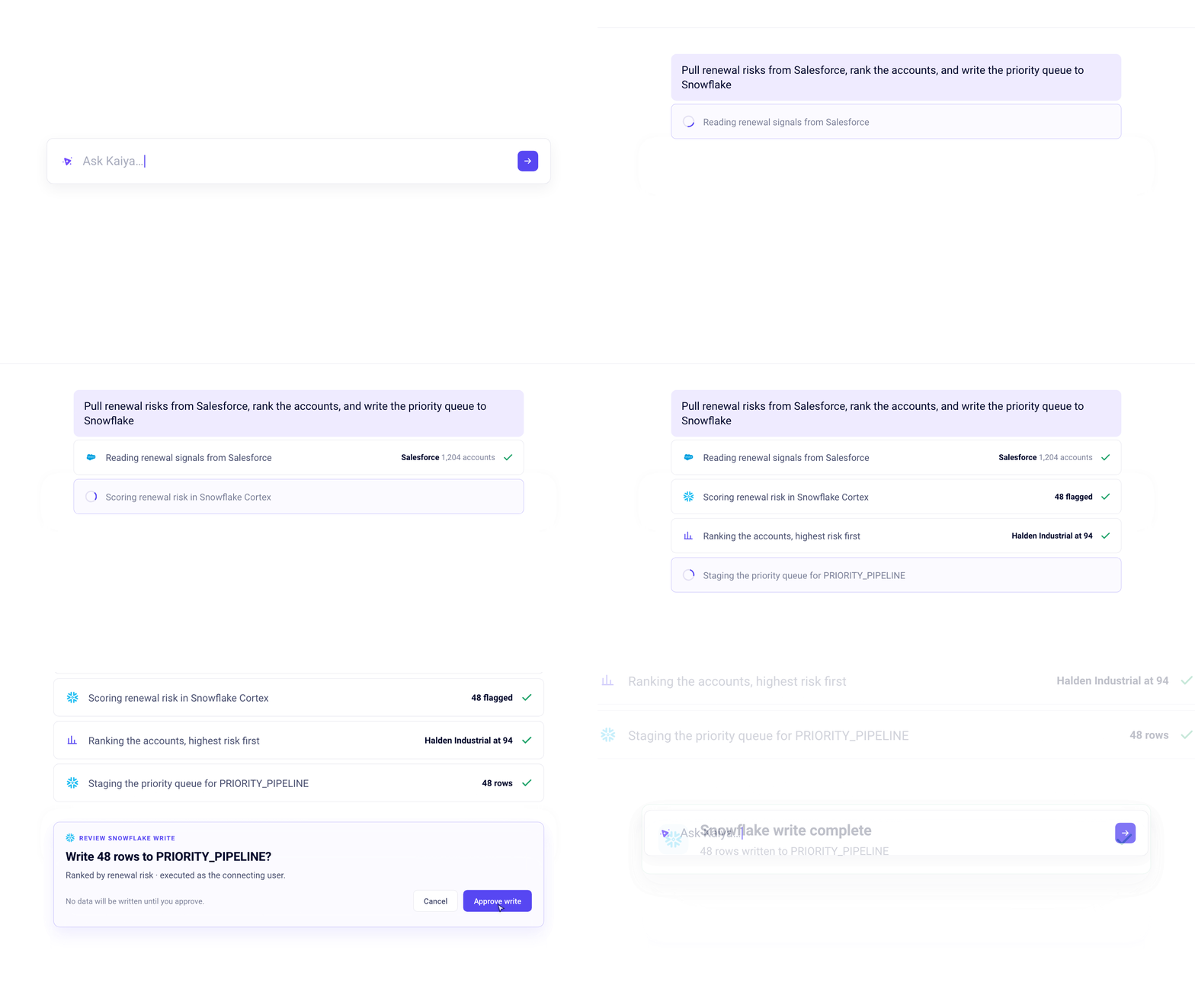
Writes are where the value lands and where the risk lives, so the control is specific. Every write is presented for review and executed only once approved. Each time, in conversation, in Apps, and in Missions alike, including one a scheduled Mission reaches partway through a run. The review shows the operation, the destination, the rows, and the identity that will perform it. The write runs as the connecting user, under that person's permissions, rather than under a shared service account. Snowflake supports both reads and writes today. Other servers expose the operations their tools allow.
Back to the East. The at-risk territories are ranked. Kaiya pulls the latest call activity from Salesforce as an input step, rescores against it, and prepares twelve reviewed actions for the field action queue in Snowflake: territory, owner, reason, next step. The commercial lead sees the operation, the table, the twelve rows, and her own name as the identity that will run it. Nothing has been written. She approves it, and Monday's call plan reflects what happened in the field last week. (The East scenario and its figures are illustrative.)
If you ask Kaiya to search a system you have not connected or authorized, it says so and asks you to connect it. It does not answer from a different source in its place.
For teams that would rather keep model execution inside their own Snowflake account, Kaiya now runs on models hosted there through Cortex Inference, alongside models from OpenAI, Anthropic, and Google. LLM consumption then draws on Snowflake credits already committed rather than a separate model spend. This covers inference. It does not mean every processing step stays inside Snowflake, and it is separate from the approval-gated MCP actions above.
Every number can be traced back, and the limits of that claim
We don't claim Kaiya never hallucinates, and a vendor who promises zero is overselling. What 6.4 changes is that a wrong number got harder to hide and easier to catch.
Read more on any figure opens its provenance: whether it was matched from the data, calculated, or derived, with the query, the source, and the dataframe behind it. The Thought process panel shows the schema Kaiya read, the skills it loaded, the queries it ran, and what each returned. Summaries are checked against the data that executed, and a claim the data does not support is regenerated rather than shipped. When data is not found, that is stated at the top of the response rather than buried in it.
When a number looks wrong, ask. The Debug Assistant is now inline in the Mission conversation. Its replies are not saved to the Mission and do not touch the planner, so you interrogate a draft without altering it. Ask which step is responsible for an output, why a run was slow, or how Kaiya approached the analysis, and the reply shows the steps that ran, the query behind each one, and what it returned.
Reproducibility is the other half. A Mission's SQL is authored once, at creation, with placeholders for run-time inputs, and each run substitutes values rather than regenerating the query. The Monday number comes from the same SQL as last Monday's. A failing Python step in a scheduled run fails visibly instead of being patched on the fly with placeholder data. Row-level policy resolves the same way in chat, in Apps including live Apps, and in Missions, so a person sees the rows they are entitled to see regardless of which surface asked.
Versions close the loop. Every Mission version you publish is kept, listed with the date and time it went live, and one is marked Active. Scheduled and manual runs execute the active version, and you choose which that is. When a Kaiya answer came from a Mission, the answer names the Mission, the version that ran, and how it was started. Apps move to the same model: edits collect in a draft, a version is created when you publish, and you can name it. When someone questions a figure three weeks after the briefing went out, the team finds the version and the calculation that produced it.
Memory follows the same principle. Nothing is stored in the background. A correction or a clarification in chat offers a card to save it, and you decide. The memories applied to a given answer are shown in the thought process, so you see what Kaiya assumed and where it came from.
Why the governed context underneath still decides
Anyone can wire a model to a warehouse. What stays hard is the context the model does not have: what your metrics mean, which source wins when two disagree, how your business decides, and who is allowed to see which rows. The review points in 6.4 depend on it. Plan mode is only useful if the plan is written against governed definitions. An approved write is only safe if row-level policy resolved correctly before the rows were proposed. A traced number is only worth tracing if the Business View behind it was modeled right.
That is why Kaiya Architect, the agent that builds those Business Views, keeps getting sharper in this release. It checks join coverage before you commit to a model, previews representative KPIs while the plan exists, investigates a figure that looks wrong and proposes restructuring into separate Business Views where a single joined view would inflate the totals, and runs a health check at publication. The controls above sit on that foundation.
Where this is headed
An agent, in the sense we mean it, is a bounded piece of work with one job: the Monday territory briefing, the close variance package, the renewal risk queue. An AI worker is the standing role that runs a number of those agents for one function, with shared context across all of them. That is the shape Tellius is taking: an AI solution for the commercial team, or the finance team, or the revenue team, staffed by an AI worker that knows how that team decides.
What changes for the people in those teams is the job itself. The analyst stops producing the number by hand and starts setting the rules the worker runs by, reviewing what it proposes, and approving what leaves. Get that right and the recurring work runs every week with a known calculation and a reviewed route into action. Stop halfway, with an AI that answers but never finishes, and the eighty percent stays where it has always been.
Next steps
If your team already has a recurring deliverable it rebuilds by hand, that is the place to start. Ask Kaiya the question behind it, turn the answer into a Mission, run Preview, and publish the version you trust. If your team is already building agents on top of your warehouse, connect Tellius as an MCP server for the governed answers and let Kaiya act as a client where the work has to end in another system.
Get release updates delivered straight to your inbox.
No spam—we hate it as much as you do!

.png)
Tellius 6.4 lets Kaiya carry a question into finished work with review points along the way. Plan mode shapes an App before anything is built. Chat, Apps, and Missions share one space, so an answer becomes an App or a Mission with the context carried across. Deep Insights runs as a single agent that checks the data before planning and repairs a failing step. Kaiya is now an MCP client that brings connected records into an analysis and writes back to Snowflake with every write approved. Missions gain a single build workspace with Preview, inline debugging, and retained published versions. Industry Packs let an administrator publish App and Mission templates.
An agent is a bounded workflow with one defined job, its own plan, inputs, validation rules, and run history. An AI worker is the persistent role that runs a number of agents for one business function, with shared context across them. In Tellius, Kaiya is the AI worker, and a Mission is a scheduled, repeatable job that Kaiya runs.
Plan mode is a setting for Kaiya Apps chat in Tellius in which Kaiya reads your schema and writes the App definition but builds nothing and runs nothing. You iterate on pages, sections, and analyses, ask questions about the data, and approve the build when the plan is right. Because a Plan-mode turn never queries your source, it costs no warehouse time.
The Tellius MCP server lets an external client such as Claude, ChatGPT, or Cursor call into Tellius for governed answers. In 6.4 Kaiya is also an MCP client. It queries servers you have connected, saves the result as an input step in a Deep Insight, Mission, or App, and writes back where a server supports it.
No. In Tellius every write is presented for review and executed only once approved, each time, in conversation, in Apps, and in Missions, including a write a scheduled Mission reaches partway through a run. The review shows the operation, destination, rows, and identity, and the write runs as the connecting user. Snowflake supports reads and writes today. Other servers expose the operations their tools allow.
In Tellius, a Mission's SQL is authored once at creation and parameterized at run time, so each run executes the same query against current data. The figures change when the data changes, and the calculation does not. The narrative wording an LLM writes around those figures can still vary. Preview lets you check the draft before publishing, and every published version is retained so you see which one produced a given briefing.
It means Tellius runs Kaiya's model calls on models hosted in your Snowflake account, so LLM consumption draws on Snowflake credits. It covers inference only. It does not mean every processing step stays inside Snowflake, and it is separate from MCP reads and writes.
Yes. Tellius resolves row-level policy the same way in chat, in Apps including live-query Apps, and in Missions. A user sees the rows they are entitled to see on every surface.
They keep running. Plans, steps, versions, schedules, triggers, run history, and briefings are unaffected. Tellius 6.4 retires the form-based Classic Editor, so every new Mission is built by describing it to Kaiya. Missions built in the Classic Editor remain in place as read-only reference and come back into view with a Type filter.
An Industry Pack is a library of App and Mission templates that an administrator publishes for a Tellius workspace. A template is an exported App or Mission. On import, Tellius matches the template's Business View to yours and reports how closely the columns fit before building, so a team starts from working analysis rather than an empty workspace.
.webp)
Kaiya Everywhere: Intelligence That Knows Your Business, Now Wherever You Work

Tellius 6.3 marks a major step toward making enterprise AI available wherever work happens. With Kaiya Everywhere, users can access trusted AI-powered analytics directly from Slack, Microsoft Teams, dashboards, browsers, enterprise applications, and AI tools through MCP integrations. The release also introduces powerful new capabilities for domain reasoning, enabling organizations to combine business context, semantic definitions, institutional knowledge, and analytical best practices into every AI interaction. New Kaiya Skills make it easier to customize how AI performs analysis, generates insights, creates visualizations, and executes workflows, while enhancements to memory, phrase learning, and query learning help AI become more accurate over time. Tellius 6.3 also streamlines onboarding, allowing teams to connect data, build business views, and start generating trusted answers in minutes. Together, these innovations help enterprises move beyond generic AI assistants to AI that understands their business, reasons with context, and delivers actionable insights wherever decisions are made.